Optimizing a Shopify store’s technical SEO means ensuring your website is searchable, fast, structured, and fully understood by both users and search engines. Good technical SEO lays the foundation upon which all other optimization — from content strategy to link building — stands.
This guide explains how to do technical SEO for a Shopify store using clear, systematic methods suitable for beginners and intermediate professionals. You’ll learn not just what to fix, but why it matters and how to apply each principle sustainably.
What Is Technical SEO for Shopify?
Technical SEO refers to improving the backend and structural elements of your Shopify website so that search engines can crawl, index, and understand it efficiently.
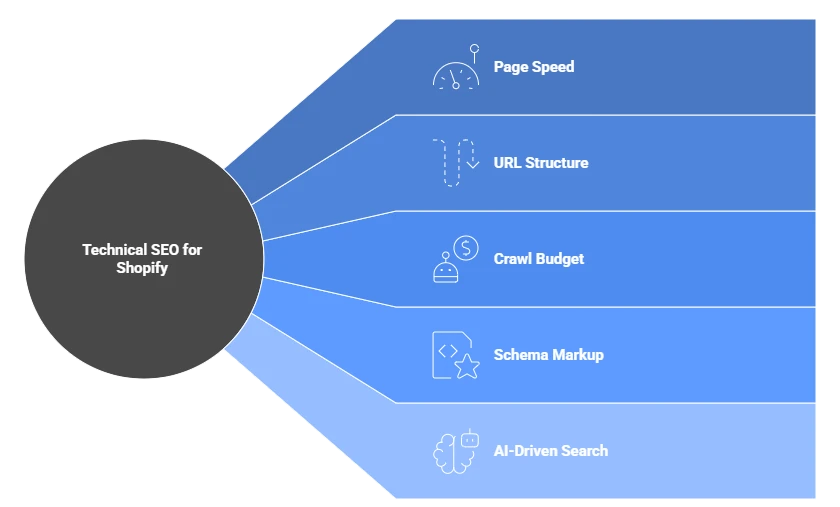
Unlike content optimization (which focuses on keywords and copy), technical SEO ensures that:
- Pages load fast.
- URLs and navigation are logically structured.
- Crawl budgets are not wasted.
- Schema markup enables richer search results.
- AI-driven search tools (like Google’s SGE) can extract information effectively.
Because Shopify is a hosted platform with certain limitations, you’ll often work within constraints rather than customizing everything from scratch — but the fundamentals remain universal.
Why Technical SEO Matters for Shopify Stores
Shopify merchants often focus on product images and marketing campaigns, yet neglect the hidden machinery that drives organic performance. Technical SEO determines whether your products and content are:
- Discoverable by search engines.
- Displayed accurately in search results.
- Capable of ranking against competitors with cleaner structures or faster sites.
In practical terms, even if your content is excellent, technical flaws (like duplicate URLs, slow scripts, or broken internal links) can prevent rankings from improving.
Key Pillars of Technical SEO for Shopify
Let’s break down the workflow into core pillars that define a technically sound Shopify website.
1. Site Structure and URL Optimization
The first step in understanding how to do technical SEO for a Shopify store is ensuring your structure makes logical sense — both to search engines and to humans.
Best Practices:
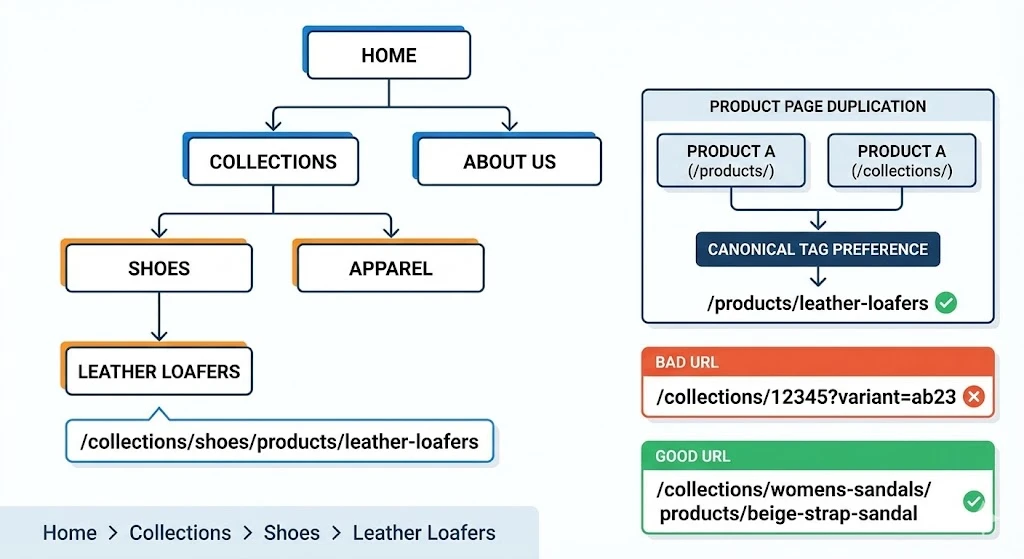
- Hierarchical clarity: organize pages under logical collections, e.g., /collections/shoes → /products/leather-loafers.
- Avoid unnecessary duplication: product URLs can appear under both /products/ and /collections/; use canonical tags to indicate the preferred version.
- Simplify URLs: don’t stuff with keywords or parameters. Keep URLs short and descriptive.
- Breadcrumb navigation: helps both users and crawlers understand page relationships.
Example:
/collections/womens-sandals/products/beige-strap-sandal
is cleaner and more contextual than
/collections/12345?variant=ab23.
2. Crawlability and Indexation
Search engines use bots to crawl your store. If bots can’t reach or interpret parts of your site, those pages won’t appear in results.
To Ensure Proper Crawling:
- Check robots.txt: Shopify auto-generates it, but verify important pages aren’t blocked.
- XML Sitemap: Shopify automatically provides one at yourstore.com/sitemap.xml; ensure it includes all active collections and products.
- Canonical Tags: Prevent duplicate content issues across variant or collection-based URLs.
- 404 and Redirects: Use 301 redirects for removed products; avoid redirect chains.
Technical Tools:
- Google Search Console (coverage report).
- Screaming Frog or Sitebulb (crawl diagnostics).
3. Site Speed and Core Web Vitals
Performance directly influences user experience and rankings. Shopify’s built-in infrastructure is solid, but heavy themes and third-party apps can slow things down.
How to Optimize:
- Choose lightweight themes and disable unused scripts.
- Compress images: Shopify automatically handles WebP conversion, but manual optimization (using tools like TinyPNG) still helps.
- Lazy-load media: delays offscreen image loading for smoother page performance.
- Limit apps: each third-party app often adds scripts; periodically audit and remove redundant ones.
- Use Shopify’s global CDN: to ensure consistent delivery across geographies.
Focus Metrics:
- Largest Contentful Paint (LCP)
- Cumulative Layout Shift (CLS)
- Time to First Byte (TTFB)
Efficient performance supports better user engagement and AI summarization since generative systems prefer faster-loading, stable sources.
4. Structured Data (Schema Markup)
Structured data helps search engines understand the context of your products and pages. Shopify supports schema through Liquid templates and JSON-LD injection.
Essential Schema Types for Shopify:
- Product — communicate name, price, availability, and reviews.
- Organization — defines your business identity.
- BreadcrumbList — reinforces hierarchy paths.
- FAQPage or HowTo (for content pages) — eligible for enhanced snippets.
Shopify apps can automate schema insertion, but manual customization yields cleaner data. Validate with Google’s Rich Results Test.
5. Mobile Optimization and Responsive Design
Almost all Shopify themes are mobile-ready, but performance varies with customization.
Ensure:
- Elements fit the viewport.
- Buttons and navigation are touch-friendly.
- Popups or overlays don’t block key content.
- Images scale properly on smaller screens.
Mobile UX directly impacts SEO rankings and conversion. Use Chrome DevTools or PageSpeed Insights to simulate and test multiple devices.
6. Duplicate Content and Canonicalization
Shopify’s URL structure naturally creates duplicate variations, especially across collections.
Common Duplication Sources:
- Product appearing under multiple collections.
- Internal search results indexed accidentally.
- Pagination and filter parameters creating thin, repetitive pages.
Solutions:
- Implement rel=”canonical” pointing to the main product URL.
- Disallow internal search pages in robots.txt.
- Consolidate content under a primary version when similar products exist.
This preserves crawl efficiency and ensures authority signals consolidate on one URL.
7. Image and Media Optimization
Visual assets drive ecommerce engagement but can bloat page size.
Optimization Steps:
- Use consistent aspect ratios for product images.
- Serve modern formats (WebP, AVIF).
- Include descriptive alt text with keywords (contextual, not stuffed).
- Implement responsive image scaling for varying devices.
- Use CDN caching wherever possible.
Bonus: structured image data improves LLM extraction quality since descriptive alt attributes help AI models interpret context correctly.
8. Internal Linking and Navigation
Smart internal linking builds topical depth and distributes authority across your site.
Techniques:
- Link related products or guides naturally in product descriptions.
- Create “hub” collection pages for high-level topics.
- Keep navigation menus clean — limit to essential paths.
- Maintain balanced link depth; key pages should be accessible within 3 clicks.
Internal linking also strengthens your generative optimization footprint, as LLMs rely on internal context to resolve relationships between entities.
9. Technical SEO for AI and Generative Search
Modern SEO extends beyond indexing into GEO (Generative Engine Optimization) and AEO (Answer Engine Optimization). Shopify stores can prepare for AI search by structuring data and language clearly.
GEO Optimizations:
- Use schema markup for products and reviews to feed AI summaries.
- Maintain structured headings and descriptive entities on landing pages.
- Ensure consistent metadata across site, social profiles, and local listings.
AEO Readiness:
- Write short factual intros for key pages.
- Use Q&A format in product FAQs.
- Optimize language for extraction (clear sentences, one fact per line).
By aligning your Shopify site for generative extraction, you future-proof visibility as search experiences evolve.
10. Security and Technical Trust Signals
Google expects secure, trustworthy infrastructure. Shopify covers core security, but best practice requires monitoring.
Key Trust Signals:
- HTTPS (auto-enabled on Shopify, always verify).
- Spam protection on forms.
- 404 monitoring to fix broken links.
- Clear privacy policies and contact information.
Strong technical hygiene not only influences rankings but also enhances perceived credibility for visitors and AI systems alike.
Tools for Technical SEO Auditing on Shopify
| Tool | Purpose |
| Google Search Console | Crawl errors, coverage, and performance data |
| Screaming Frog / Sitebulb | Deep technical audits |
| Ahrefs / Semrush | Backlink and performance analysis |
| PageSpeed Insights / Lighthouse | Site speed and Core Web Vitals |
| Schema.org Validator | Structured data inspections |
Common Technical SEO Mistakes on Shopify
- Relying solely on plugins without auditing generated code.
- Ignoring canonical setup for product variants.
- Installing excessive apps that slow the site.
- Overlooking mobile speed metrics.
- Forgetting image alt text and naming conventions.
Avoiding these pitfalls keeps your technical foundation clean and scalable.
Technical SEO Implementation Checklist for Shopify
- Clean URL structure and sitemap verified
- Canonical tags implemented correctly
- Fast page loading under 3 seconds
- Structured data validated
- Mobile usability confirmed
- Redirects managed without chains
- Duplicate content audited
- Internal linking optimized
- Security and HTTPS in place
- GEO and AEO alignment reviewed
Conclusion
Learning how to do technical SEO for a Shopify store means mastering both fundamentals and platform nuances. Shopify simplifies many aspects of ecommerce management, but technical vigilance ensures that every product, image, and snippet communicates effectively to search engines and generative systems alike.
Start from structure, monitor performance regularly, and apply schema and speed improvements iteratively. When your store’s technical foundation is strong, every other optimization — from keyword strategy to AI visibility — performs exponentially better.
If you need someone to solve all technical errors for your shopify store contact info@leanscalemedia.com